 Stavka
 for accountants: all your flat-rate clients on one page
Your client issues invoices in Stavka and grants you access. On one page you see who is close to a limit, whose invoices are overdue and every client’s KPO ledger — no chasing invoices by e-mail and no retyping.
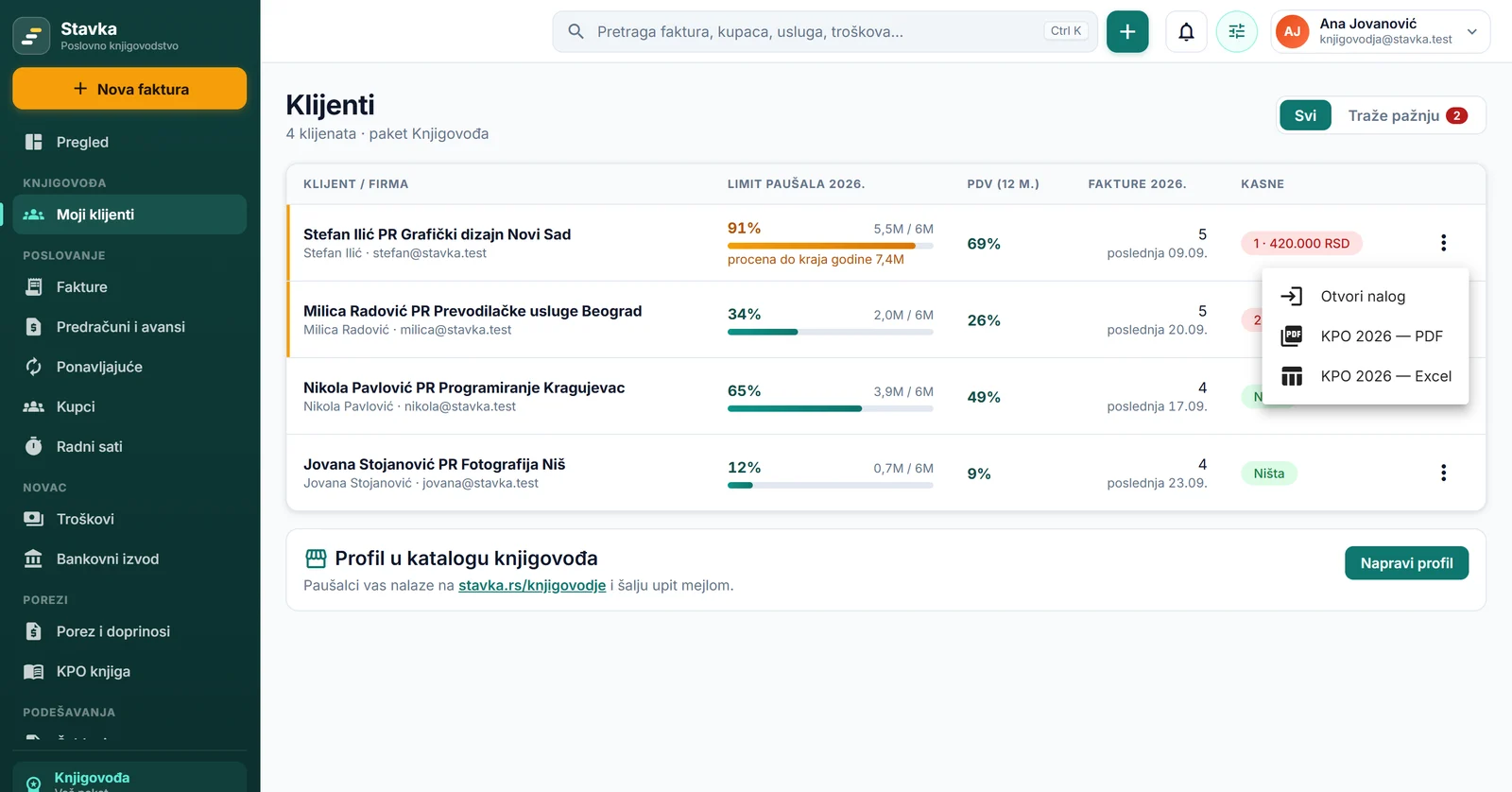
What you see for each client
- The 6 million limit — how much the client has earned this year and a forecast to the end of the year, so you see in time who is going to exceed it.
- The 8 million VAT limit — turnover in the last 12 months.
- Overdue invoices — number and amount. The “Need attention” filter leaves only the clients where something is wrong.
- KPO ledger — export to PDF or Excel for each company, from the same menu.
- Open account — you work in the client’s account as if you were them: invoices, KPO ledger, expenses, tax and contributions.
Flat-rate entrepreneurs find you in the directory
At stavka.rs/knjigovodje, flat-rate entrepreneurs and people who are just opening a business pick a city and a service — flat-rate, LLC (d.o.o.), VAT, payroll, company registration, SEF — and send an inquiry by e-mail directly to you. When a flat-rate entrepreneur in Stavka gets close to the 6 or 8 million limit, the app suggests talking to an accountant and takes them to the directory: that is when they decide on self-assessment (samooporezivanje), VAT or an LLC.
- Listing is free, on the Start plan too, with no commission per client.
- Enter your agency’s registration number (matični broj): after a check in the APR register of accounting service providers you get a mark that you are verified and appear ahead of unverified accountants.
- The order changes every day, so nobody is always first.
You create your profile on the “Clients” page, in the “Accountant directory profile” section.
How to start
- Open an account at stavka.rs — free, with a Google or Microsoft account or by e-mail.
- In Settings (the menu with your name, top right) turn on two-factor authentication. It is mandatory for working in someone else’s account: otherwise one stolen password would open the books of all your clients.
- Your client enters your e-mail address in Settings, under “Accountant access”.
- In the menu you pick a client and work in their account. All clients are on the “Clients” page.
Pricing
| Start | Accountant | |
|---|---|---|
| Price | 0 RSD | 1,990 RSD a month or 19,900 RSD a year |
| Clients included | up to 3 | 10, each additional one 100 RSD a month (1,000 RSD a year) |
| From client 101 | — | 70 RSD a month (700 RSD a year) per client |
| Pro features in client accounts | — | ✓ SEF, sending invoices by e-mail, reminders, invoice copy, payment link, bank statements — even when the client has no paid plan |
| Profile in the accountant directory | ✓ | ✓ |
A client pays nothing to give you access. You pay by proforma invoice, with a bank transfer.
Your client uses Stavka, but you don’t?
The client enters your e-mail address with their company, and by the 10th of each month you receive the monthly package for the previous month: an Excel file with income, expenses and payments, a PDF of every invoice and photos of receipts. You don’t need a Stavka account for this and you pay nothing.
Frequently asked questions
What happens when I get a fourth client on the free plan?
The first three clients (in the order they granted access) stay available; for the others you need the Accountant plan. Client data is not deleted and nothing is lost.
Do I see the accounts of clients who moved to full books?
Yes. On the “Clients” page such a company is marked “Full books”, and in its account Stavka shows income, expenses and the result instead of the KPO ledger and the flat-rate limit.
Where is the data and who can access it?
Everything about data storage, encryption and export is on the Security and data page.